

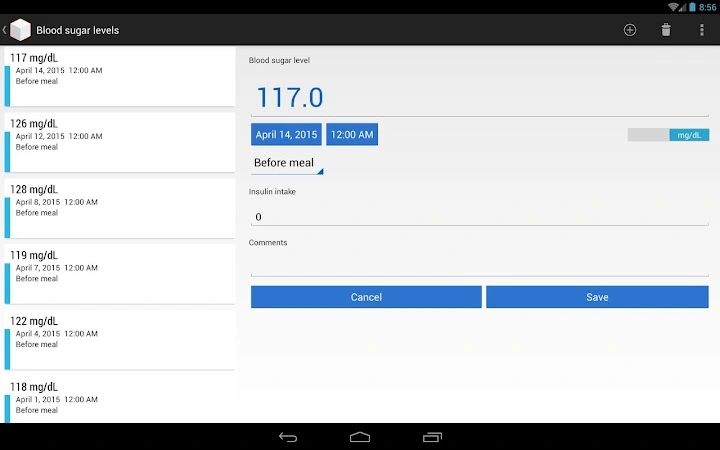
Description
Track Blood Sugar Levels with Ease
Overview
Blood Sugar Manager is a desktop application designed to help individuals manage their diabetes by tracking blood glucose levels efficiently. The software provides a straightforward method for logging daily readings, enabling users to maintain consistent oversight of their health metrics. It is particularly useful for people who require regular monitoring and want a simple, structured way to record and review their data without relying on mobile apps or paper logs.
The tool supports both US (mg/dL) and international (mmol/L) units, offering a two-way converter to ensure accurate data interpretation across different regions. This feature is especially helpful for users who travel or consult healthcare providers using different measurement standards. The application also allows users to review past entries, helping them identify patterns over time. It is suitable for patients managing type 1 or type 2 diabetes, as well as caregivers supporting loved ones with diabetes.
While the developer's background is not specified, the software’s focus on usability and core health tracking functions suggests a targeted approach to diabetes management. Real-world usage includes daily logging before meals, post-meal checks, and weekly reviews with healthcare providers. The ability to generate HTML reports for 7, 15, or 30-day periods adds value for clinical discussions and personal health tracking.
Key Features & Capabilities
- Quick Entry Interface – A streamlined input method allows users to record blood glucose levels in seconds, minimizing friction during daily routines.
- Historical Data Access – Past measurements are stored and accessible for review, supporting long-term health monitoring and trend analysis.
- Unit Conversion Tool – Built-in two-way converter between mg/dL and mmol/L ensures compatibility with international standards and medical documentation.
- Personalized Statistics – Users can compare their readings against self-defined goals, promoting proactive diabetes management (with physician guidance).
- Report Generator – Creates HTML reports for customizable timeframes (7, 15, or 30 days), useful for sharing data with healthcare professionals.
These features collectively support a structured approach to diabetes care. For example, a user can log a reading after breakfast, review weekly averages, and generate a report to discuss with their doctor. The statistics feature helps identify spikes or dips in glucose levels, enabling informed lifestyle or medication adjustments. The report generator simplifies data sharing, reducing the need for manual compilation.
User Interface, Workflow & Performance
The application features a clean, minimal interface designed for ease of use. Navigation is intuitive, with key functions—data entry, history viewing, and report generation—accessed through clearly labeled sections. The workflow is linear: record a value, view past entries, analyze statistics, and generate reports. This design reduces cognitive load, making it accessible even for users less familiar with digital tools.
Users can expect a responsive experience during routine tasks such as entering values or switching between views. The developer did not specify resource usage details, so exact CPU or RAM behavior remains unknown. However, the 28.5 MB installation size suggests a lightweight application with low system impact. Stability during extended use has not been reported, but the software’s focused functionality implies a stable operation under normal conditions.
Compatibility & System Requirements
Blood Sugar Manager is available for both Windows and Mac operating systems, supporting a broad range of desktop users. The software version is 2.3, with a file size of 28.5 MB, indicating a compact installation. Exact system requirements were not listed, so users should ensure their system meets general standards for desktop applications.
Compatibility information is limited to the operating systems mentioned. The developer did not provide additional system requirements, such as minimum RAM, processor speed, or disk space. Users are advised to verify that their device can run standard desktop software before installation. The software does not appear to require internet access for core functions, supporting offline use.
Pros and Cons
Pros
- Simple, fast data entry for daily glucose tracking
- Supports both mg/dL and mmol/L units with two-way conversion
- Enables long-term data review and trend analysis
- Generates shareable HTML reports for medical consultations
- Available at no cost for Windows and Mac users
Cons
- No information provided about system requirements or hardware compatibility
- Resource usage and performance under heavy use were not specified
- Offline functionality is assumed but not confirmed
- Limited to desktop platform; no mobile or cloud integration mentioned
FAQ Section
Is Blood Sugar Manager compatible with Windows and Mac?
Yes, the software is designed for both Windows and Mac operating systems, allowing users on either platform to track their blood glucose levels.
Can I use Blood Sugar Manager without an internet connection?
While the developer did not specify connectivity requirements, the core functions—data entry, history review, and report generation—do not appear to require internet access.
Is the software safe to use for managing diabetes?
Blood Sugar Manager is a tool for tracking glucose levels. It is not a medical device or diagnostic tool. Users are advised to consult their physician before making any health decisions based on the data collected.
How often can I update the software?
Updates are available through the official distribution channel. The current version is 2.3, released on August 10, 2023.
What type of license does Blood Sugar Manager use?
The software is provided free of charge, with no restrictions mentioned regarding usage, personal or professional, on supported platforms.
Final Thoughts + CTA
Blood Sugar Manager offers a focused, user-friendly solution for individuals managing diabetes through regular blood glucose monitoring. Its core features—quick logging, unit conversion, statistics, and report generation—address essential needs in a streamlined way. The absence of cost makes it accessible to a wide audience, while its desktop nature ensures data remains local and private.
While system requirements and performance details are not fully disclosed, the software’s lightweight footprint and clear interface suggest reliable performance for everyday use. It is best suited for users who prefer a dedicated desktop tool over mobile apps and value structured data tracking.
For those seeking a simple, secure, and free way to monitor their blood sugar levels on PC, this tool delivers real value. Download Blood Sugar Manager now.
Guides & Tutorials for Blood Sugar Manager App for Chrome
How to install Blood Sugar Manager App for Chrome
- Click the Preview / Download button above.
- Once redirected, accept the terms and click Install.
- Wait for the Blood Sugar Manager App for Chrome download to finish on your device.
How to use Blood Sugar Manager App for Chrome
This software is primarily used for its core features described above. Open the app after installation to explore its capabilities.
User Reviews for Blood Sugar Manager App for Chrome 0
No reviews found





